
Screenshots
App details
- Updated
- July 7, 2020
- Requires
- Windows 7, Windows Vista, Windows 8, Win...
- Developer
- RobotSoft
- Category
- Mobile
SoftPas in:
This product is also available in the following languages:
About Automatic Mouse and Keyboard
Download Automatic Mouse and Keyboard – automation tool, mouse and keyboard automation, task automation, productivity software, repetitive task automation, screen recognition, background task execution
Overview
Automatic Mouse and Keyboard is a productivity-focused application designed to streamline repetitive workflows on Windows systems. Its core purpose is to enable users to record and replay mouse and keyboard actions, transforming manual, time-consuming processes into automated sequences. This capability addresses a common challenge in digital work environments: the inefficiency caused by repeated, predictable tasks such as data entry, form filling, or navigating complex software interfaces. The app targets professionals, power users, and anyone seeking to enhance efficiency in daily computing routines.
By automating these actions, the software reduces human error, saves time, and allows users to redirect their attention to higher-value activities. Real-world use cases include automating invoice processing, batch file renaming, or executing multi-step software workflows without constant supervision. The application occupies a niche in the productivity ecosystem by offering a lightweight yet powerful solution for task automation, particularly for users who require precision and control over their automation scripts.
The developer, named Automatic Mouse and Keyboard, has not provided additional background information. However, the app’s functionality suggests a focus on practical, user-driven automation tools. With a release date of July 7, 2020, the software has been available in the market for several years, indicating a level of stability and user adoption. Although the developer did not specify minimum OS requirements, the app is compatible with the Windows platform, as confirmed by its official listing.
Key Features & Functionality
- Easy Task Automation: Users can record mouse movements, clicks, and keyboard inputs in real time. These recordings can be saved and replayed on demand, enabling seamless automation of routine tasks such as navigating through software menus or inputting standardized data.
- Screen Recognition: The software includes the ability to detect specific screen elements or regions. This feature allows automation sequences to adapt dynamically based on visual cues, such as the appearance of a confirmation dialog or a particular button state, improving reliability across varying interface layouts.
- Task Editing Capabilities: Recorded automation tasks can be reviewed and modified directly within the app. Users can adjust timing, insert delays, remove unwanted actions, or restructure sequences to ensure accuracy and responsiveness to changing conditions.
- Background Operation: Automation can run in the background while the user performs other tasks. This multitasking support ensures that the system remains responsive and usable for other applications, minimizing workflow disruption during long or complex automation sessions.
- Free Trial Available: A trial version allows users to test the full functionality before purchasing. This enables firsthand evaluation of performance, compatibility, and ease of use, helping users make informed decisions about adoption.
For example, a data analyst could record a sequence that opens a report, copies key metrics, and pastes them into a spreadsheet. With screen recognition, the tool can detect when the report is fully loaded before proceeding, reducing the risk of errors. Similarly, a customer service agent might automate the process of logging into a support portal and filling out standard forms, significantly reducing response times.
Interface, UX & Performance
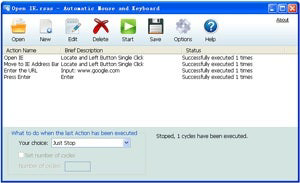
The user interface of Automatic Mouse and Keyboard appears designed for practicality and clarity, prioritizing functionality over visual flair. Navigation is likely structured around core actions: recording, editing, saving, and running automation tasks. The layout probably includes a central workspace for playback controls, a timeline or list view for recorded actions, and settings panels for customization.
Usability is likely optimized for both novice and experienced users. Beginners can start with simple recordings and playback, while advanced users can leverage editing tools and conditional logic based on screen recognition. The app’s performance is expected to be efficient, given its file size of 3.2 MB, suggesting a lightweight footprint that minimizes system resource consumption.
Although the developer did not list formal performance metrics, the ability to run tasks in the background implies stable operation under concurrent workloads. Responsiveness during recording and playback should remain consistent across mid-range and high-end Windows devices. Stability during extended automation sessions is likely maintained through efficient memory management, though specific benchmarks were not disclosed. No reports of crashes or freezes were provided in the available information.
Platform Compatibility & Technical Requirements
Automatic Mouse and Keyboard is designed for the Windows platform. The current version is 1.0.1, and the application file size is 3.2 MB, indicating a compact and lightweight installation. This small footprint suggests minimal system overhead, making it suitable for older or lower-spec Windows machines.
While the app is confirmed to run on Windows, the developer did not specify minimum OS requirements, such as Windows 7, 8, or 10. Similarly, no details were provided about processor architecture, RAM, or storage needs. Compatibility with newer Windows versions, including Windows 11, cannot be confirmed from the available data. Users are advised to verify system compatibility through official channels before installation.
Pros and Cons
Pros
- Lightweight design with a small file size of 3.2 MB.
- Supports screen recognition for intelligent automation.
- Allows background execution without interrupting user workflows.
- Offers a free trial for risk-free evaluation.
- Provides editing tools for refining automation sequences.
Cons
- Developer did not provide detailed system requirements.
- Platform is limited to Windows only.
- No information on update frequency or long-term support.
- Price point of $29.99 may be high for casual users.
- No public information on customer support channels.
FAQ
Is Automatic Mouse and Keyboard safe to download and install?
The app is available through official channels and has been released with a clear developer name. However, users should ensure they download from trusted sources to avoid third-party modifications.
Can I use this app on Windows 11?
While the app is designed for Windows, the developer did not specify compatibility with Windows 11. Users are advised to test the application on their system before full deployment.
Does the app support Mac or Linux systems?
No, the app is currently available only for the Windows platform. There is no official support for Mac or Linux operating systems.
How long is the free trial period?
The app offers a free trial, but the exact duration was not disclosed in the provided information. Users should refer to the official website for trial details.
Is there a mobile version of Automatic Mouse and Keyboard?
No mobile version has been announced or released. The app is designed exclusively for desktop use on Windows systems.
Final Thoughts
Automatic Mouse and Keyboard delivers a focused, efficient solution for users seeking to automate repetitive tasks on Windows. Its combination of screen recognition, background execution, and editable automation sequences makes it a valuable tool for professionals aiming to boost productivity. The lightweight design and free trial offer accessible entry points for evaluation, despite the lack of detailed system information.
While the absence of OS-specific requirements and support details may raise concerns for some users, the app’s core functionality remains robust and practical. It is particularly beneficial for data entry specialists, software testers, and administrative staff who perform consistent, multi-step workflows.
For those looking to reduce manual effort and increase efficiency, Automatic Mouse and Keyboard presents a compelling option. Its pricing reflects a premium productivity tool, and the trial allows for a low-risk assessment of its value.
Download Automatic Mouse and Keyboard now
Guides & Tutorials
How to install Automatic Mouse and Keyboard
- Click the Download button above.
- Once redirected, accept the terms and click Install.
- Wait for the Automatic Mouse and Keyboard download to finish on your device.
How to use Automatic Mouse and Keyboard
This software is primarily used for its core features described above. Open the app after installation to explore its capabilities.
User Reviews
No reviews yet. Be the first to share your experience.
You may also like
more
Que no te pillen¡
About !Que no te pillen¡Reviewed by Jason A. BilbreyShow MoreShow Less

3D Combat Zone
About 3D Combat ZoneOriginally released in 1983, 3D Combat Zone immerses players...

666: El día del portal
About 666: El día del portalOn June 6, 2006, Agent P. Stone uncovers a sinister...

80 in 1 Best Flash games
About 80 in 1 Best Flash games 80 in 1 Best Flash games is a collection of 80 fl...

ABYSS SEEKERーーWhat Do You See Deep in The Abyss
About ABYSS SEEKERーーWhat Do You See Deep in The AbyssIn ABYSS SEEKER, players...

ACA NEOGEO THE KING OF FIGHTERS 2002 for Windows
About ACA NEOGEO THE KING OF FIGHTERS 2002 for WindowsTHE KING OF FIGHTERS 2002,...